Google has officially rolled out Android 17 Beta 3, marking a significant step forward in the evolution of its mobile operating system. With a strong focus on usability, customization, and advanced system controls, the latest beta release introduces a blend of user friendly enhancements and developer oriented improvements that signal a more refined and capable Android experience ahead of its final launch.
This update is currently available for a wide range of Pixel devices, starting from the Pixel 6 series up to the latest Pixel 10 lineup. As Android 17 moves closer to stability, Beta 3 reflects Google’s commitment to delivering a polished, flexible, and intelligent mobile platform.
Smarter Screen Recording Becomes More Practical for Everyday Use
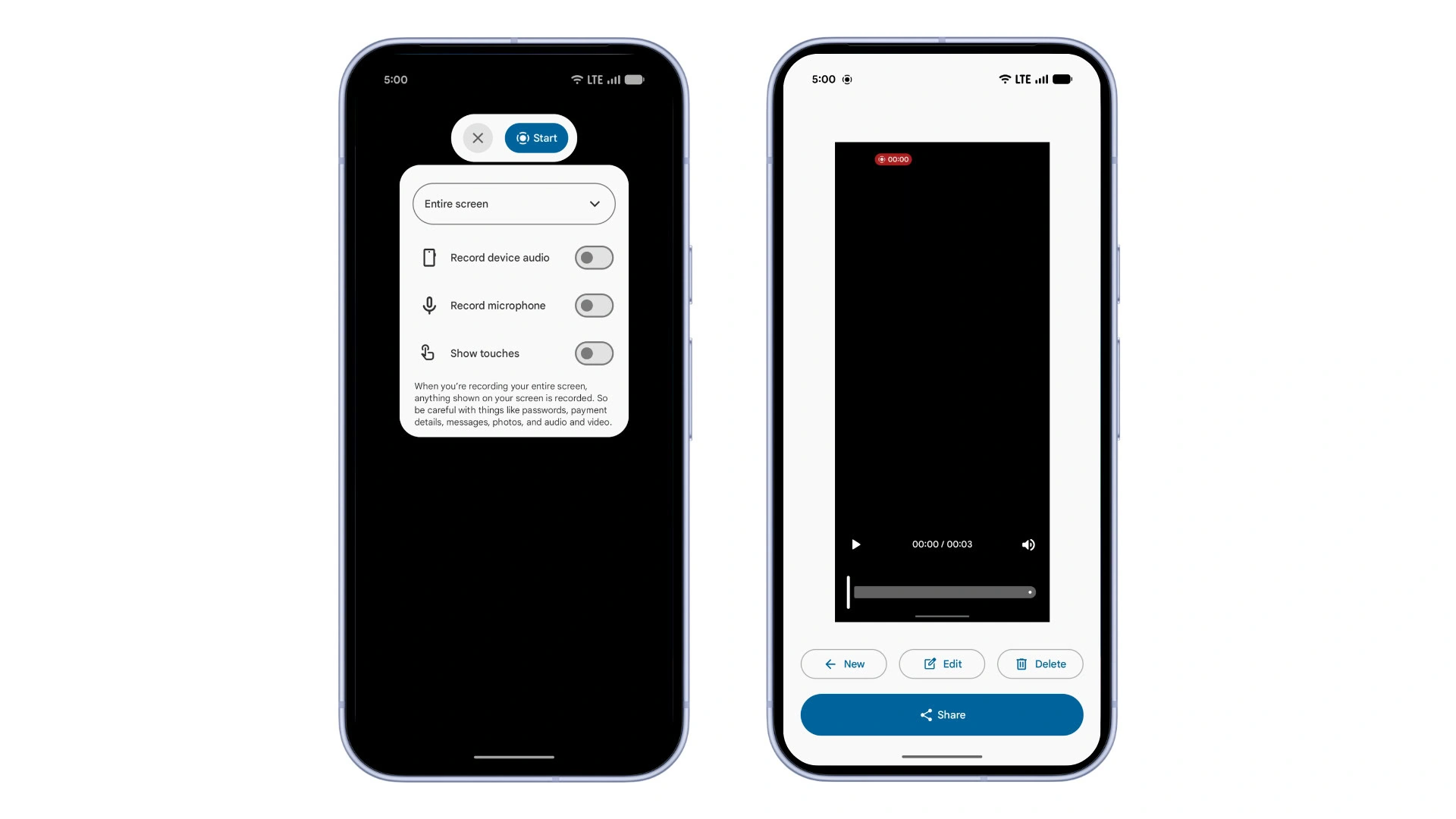
One of the standout features in Android 17 Beta 3 is the redesigned screen recording toolbar. Google has introduced a more intuitive system that allows users to choose between recording a specific app or capturing the entire screen.
This improvement may seem subtle, but it carries significant real world impact. For content creators, educators, and professionals, the ability to isolate app level recording eliminates unnecessary distractions and enhances clarity. Tutorials, demonstrations, and walkthroughs can now be produced with greater precision.
The update reflects a broader shift toward making built in tools more practical rather than merely functional. By refining such everyday features, Google continues to align Android with modern user expectations.
Expanded Bubbles Support Enhances Multitasking
Android 17 Beta 3 also expands support for Bubbles, a feature originally popularized through messaging applications. These floating, picture in picture style windows now extend to a wider range of apps.
Bubbles allow users to keep conversations or tasks accessible without constantly switching between applications. With this update, multitasking becomes more fluid and less disruptive. Whether replying to messages while browsing or managing multiple apps simultaneously, the experience feels more seamless.
This expansion signals Google’s intent to make multitasking a core strength of Android, especially as users increasingly rely on their smartphones for productivity.
Deeper Customization with Cleaner Home Screen Options
Customization has always been a defining trait of Android, and Beta 3 takes it a step further. Users can now hide app labels on the home screen, creating a cleaner and more minimal interface.
This feature is accessible through system customization settings and the wallpaper picker, offering users greater control over how their device looks and feels. For those who prefer a visually streamlined layout, icon only home screens provide a modern and distraction free aesthetic.
Such enhancements reinforce Android’s identity as a platform that prioritizes personalization without compromising usability.
Improved Photo Picker Aligns with Modern Displays
The photo picker receives a thoughtful upgrade in Android 17 Beta 3. Users can now adjust the grid aspect ratio, switching from the traditional square layout to a 9 by 16 portrait view.
This change better aligns with today’s smartphone displays, which are predominantly taller and optimized for vertical content. The updated layout enhances visual consistency across apps and improves the overall browsing experience when selecting images.
By refining even the smallest details, Google demonstrates a clear focus on user experience design.
Advanced Imaging with RAW14 and Camera Extensions
Photography capabilities see a major boost in this update. Android 17 Beta 3 introduces support for RAW14 image capture, enabling compatible camera apps to produce 14 bit RAW photos.
This advancement is particularly important for professionals and photography enthusiasts who demand higher image quality and greater editing flexibility. RAW14 captures more detail and dynamic range compared to standard formats.
In addition, device manufacturers now have the ability to define their own camera extensions. Features such as Super Resolution or AI powered enhancements can be integrated at a deeper level, opening the door for innovation in mobile photography.
Accessibility and Audio Features Take a Big Leap Forward
Accessibility remains a key focus area in Android 17 Beta 3. A new Bluetooth LE audio category allows the system to distinguish hearing aids from standard audio devices.
This enables more precise audio routing. Users can direct system sounds such as notifications and alarms independently between hearing aids and device speakers. The result is a more personalized and inclusive audio experience.
Google has also enhanced its audio system with an extended HE AAC software encoder. This improvement ensures better sound quality even in low bandwidth conditions. Additionally, loudness metadata support helps maintain consistent volume levels across different types of content.
Together, these updates highlight a strong commitment to both accessibility and audio excellence.
External Display and Desktop Mode Get Smarter
For users who rely on external displays, Android 17 Beta 3 brings improved widget scaling across varying pixel densities. This ensures that widgets remain visually consistent and functional regardless of screen size or resolution.
Desktop mode also receives a notable upgrade with interactive Picture in Picture. This feature allows apps to stay pinned, interactive, and always on top, making multitasking more efficient in larger screen environments.
These improvements indicate Google’s growing interest in bridging the gap between mobile and desktop experiences.
Enhanced Security with Smarter Password Controls
Security continues to evolve in Android 17 Beta 3. The Show passwords feature has been refined to behave differently depending on input methods.
Users will now experience separate behaviors for touch input and physical keyboards, adding an extra layer of privacy without sacrificing convenience. This change reflects a more nuanced approach to security, where usability and protection go hand in hand.
Wide Availability Across Pixel Devices
Android 17 Beta 3 is available for a broad range of Pixel smartphones, including devices from the Pixel 6 series to the latest Pixel 10 lineup.
Users interested in trying the update can enroll through the Android Beta Program or manually sideload the build. As always, beta software may contain bugs, but it offers an early look at the features shaping the future of Android.
A Step Closer to a Refined Android Experience
With Android 17 Beta 3, Google is clearly refining its vision for the next generation of Android. The update balances meaningful user facing improvements with powerful backend capabilities for developers.
From smarter screen recording to advanced imaging and deeper customization, every change contributes to a more polished and flexible system. As the beta phase progresses, Android 17 is steadily moving toward a stable release that promises to deliver both innovation and reliability.
For users and developers alike, this update is not just another iteration. It is a clear signal that Android continues to evolve in ways that prioritize real world usability while embracing the demands of modern technology.