Microsoft issues urgent out of band fix after widespread installation failures disrupt March rollout
Microsoft has released a new Windows 11 update, KB5086672, as an out of band patch following the withdrawal of its March 2026 optional update. The earlier release, KB5079391, encountered significant installation failures across multiple systems, prompting the company to halt its rollout and investigate the issue.
The newly released update aims to resolve those failures while delivering the same features originally planned for March. With this move, Microsoft seeks to stabilize affected systems and restore user confidence after an unusually disruptive update cycle.
What went wrong with the March 2026 update and why it was pulled
On March 26, Microsoft began rolling out KB5079391 as part of its optional update cycle. However, users soon reported repeated installation failures accompanied by error code 0x80073712. In many cases, systems entered a loop where the update would download, attempt installation, and fail repeatedly.
This error typically indicates missing or corrupted system files within the Windows Update components. The issue appeared widespread enough that Microsoft took the rare step of pausing the rollout entirely.
In an official statement, Microsoft confirmed that the update had a bug causing installation failures and acknowledged the need to limit its availability while the issue was being addressed. Such pauses are uncommon and signal the seriousness of the problem.
KB5086672 arrives as a corrective release with full feature set
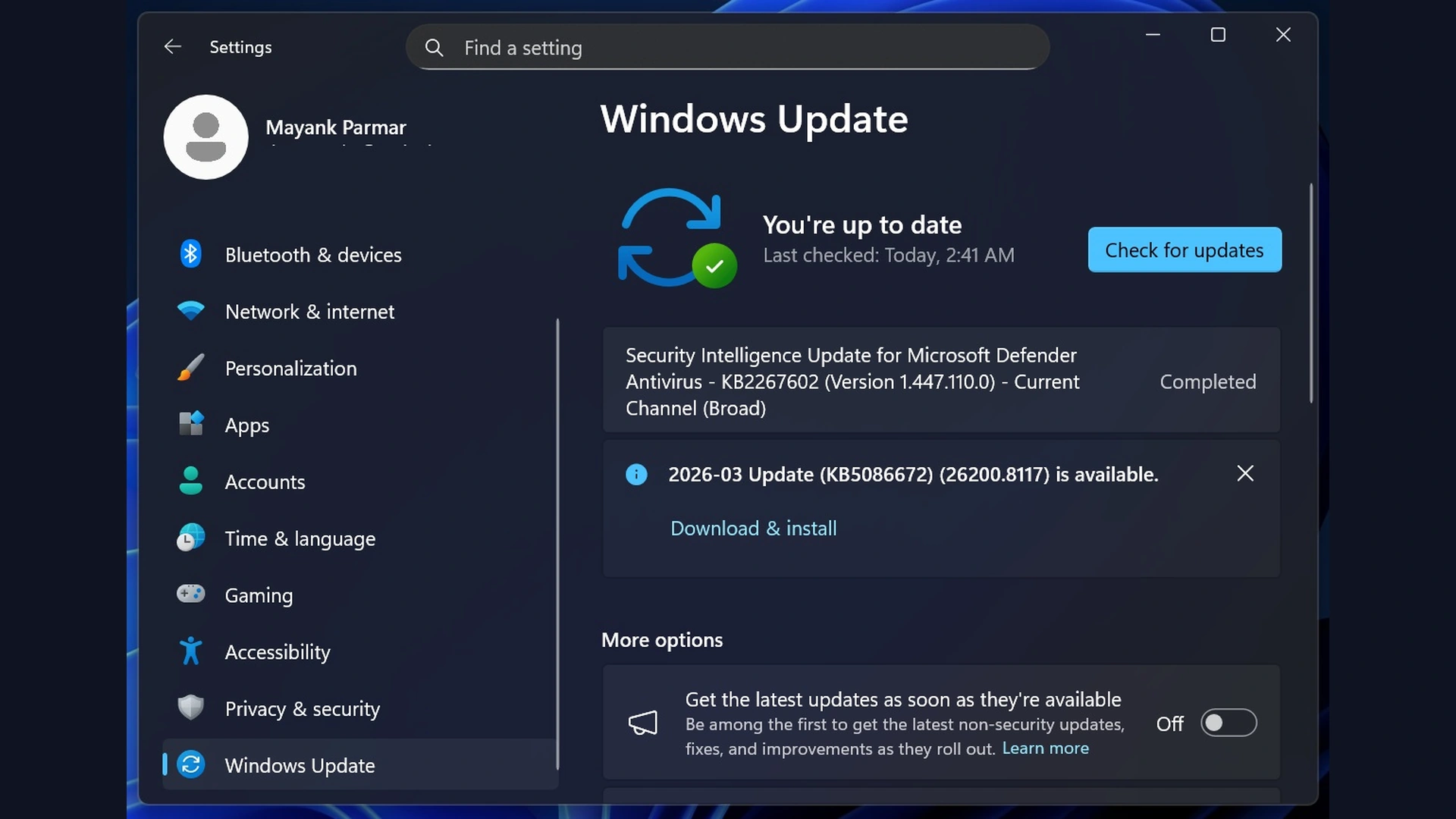
By the end of March, Microsoft responded with KB5086672, labeled as the “2026 03 Update.” Unlike standard updates that follow a predictable schedule, this release is classified as out of band, meaning it was pushed outside the usual update cadence to address urgent issues.
The update includes all the features and improvements originally intended for KB5079391 while fixing the installation errors that affected users. Systems that missed the March update can now install KB5086672 without waiting for the next scheduled release.
However, Microsoft notes that users who successfully installed the earlier update may not need this new patch, as it is essentially a revised version rather than a completely new update.
Key update details and system compatibility
The update is available for both Windows 11 25H2 and 24H2 versions, supporting x64 and ARM64 architectures. Below is a breakdown of the build details:
| Build Number | Size | OS Version |
|---|---|---|
| 26200.8117 | 5104.9 MB | Windows 11 25H2 x64 based |
| 26200.8117 | 5104.9 MB | Windows 11 25H2 ARM64 based |
| 26100.8117 | 4592.8 MB | Windows 11 24H2 x64 based |
| 26100.8117 | 4592.8 MB | Windows 11 24H2 ARM64 based |
Microsoft is gradually rolling out features, meaning not all users will see every change immediately after installation.
Smart App Control gets long awaited flexibility in Windows 11
One of the most notable improvements in KB5086672 is the enhanced control over Smart App Control. Previously, enabling or disabling this security feature required a complete reinstallation of Windows, which limited its usability.
With the new update, users can toggle Smart App Control directly from system settings without reinstalling the operating system. This change significantly improves user control and accessibility.
Smart App Control is designed to block malicious applications and protect users from potential threats. However, it has also been criticized for occasionally blocking legitimate software, including games and tools. The new flexibility allows users to experiment with the feature without committing permanently.
Support for future hardware with 1000Hz refresh rate capability
Microsoft is also preparing Windows 11 for next generation display technologies by introducing support for 1000Hz refresh rate monitors. While such displays are not yet widely available, this update ensures that the operating system is ready for future advancements in high performance hardware.
This move reflects Microsoft’s long standing approach of building forward compatibility into Windows, ensuring users can adopt new technologies without waiting for major system updates.
File Explorer improvements fix long standing preview issues
File Explorer receives important fixes in this update, particularly concerning preview functionality for downloaded files. Previously, Windows blocked previews of files downloaded from the internet for security reasons, even after users manually approved them.
In some cases, attempts to bypass these restrictions using PowerShell or Group Policy failed, leaving users unable to preview files.
KB5086672 resolves this issue, allowing approved files to be previewed correctly. Additionally, voice typing integration has been improved, enabling users to rename files using voice commands.
These enhancements aim to restore usability while maintaining security protections.
System performance, security and usability enhancements
Beyond major features, the update includes several smaller but meaningful improvements across the system:
Narrator now supports richer image descriptions on Copilot plus PCs
Users can manage Microsoft 365 subscriptions directly within system settings
Dialog boxes in account settings now match the modern Windows interface
Settings homepage loads faster, improving overall responsiveness
System File Checker no longer reports false errors
Windows Hello issues have been resolved on certain devices
USB4 connections now use lower power during sleep for better efficiency
These updates collectively enhance both performance and user experience, reinforcing Microsoft’s focus on refinement alongside new features.
No known issues reported in latest release
Microsoft has stated that it is not currently aware of any new issues in KB5086672. This is a reassuring development following the problems encountered with the previous update.
While no update is entirely risk free, early indications suggest that this release is stable and safe for most users. Those who experienced issues with the March update are especially encouraged to install this version.
A rare disruption highlights importance of rapid response
The events surrounding the March 2026 update serve as a reminder that even established update systems can encounter unexpected failures. However, Microsoft’s swift response in releasing KB5086672 demonstrates its ability to address critical issues quickly.
By delivering a corrected update within days, the company has minimized long term disruption and ensured that users still receive planned improvements without extended delays.
Conclusion
Windows 11 KB5086672 represents both a recovery effort and a continuation of Microsoft’s update roadmap. It fixes a significant installation issue while delivering meaningful enhancements across security, performance, and usability.
For users who missed or struggled with the March update, this release provides a reliable path forward. And for the broader Windows ecosystem, it reinforces the importance of stability, transparency, and timely action in maintaining trust.
As Windows continues to evolve, updates like KB5086672 show that even when things go wrong, the system can be quickly set right with careful engineering and responsive support.